Check who accepted your invites
24h+ invites surface for confirmation on the dashboard. Same flow available inline on Recipients tab rows. Yes accepted, Still waiting, or Withdraw, all user-confirmed.
Check who accepted your invites
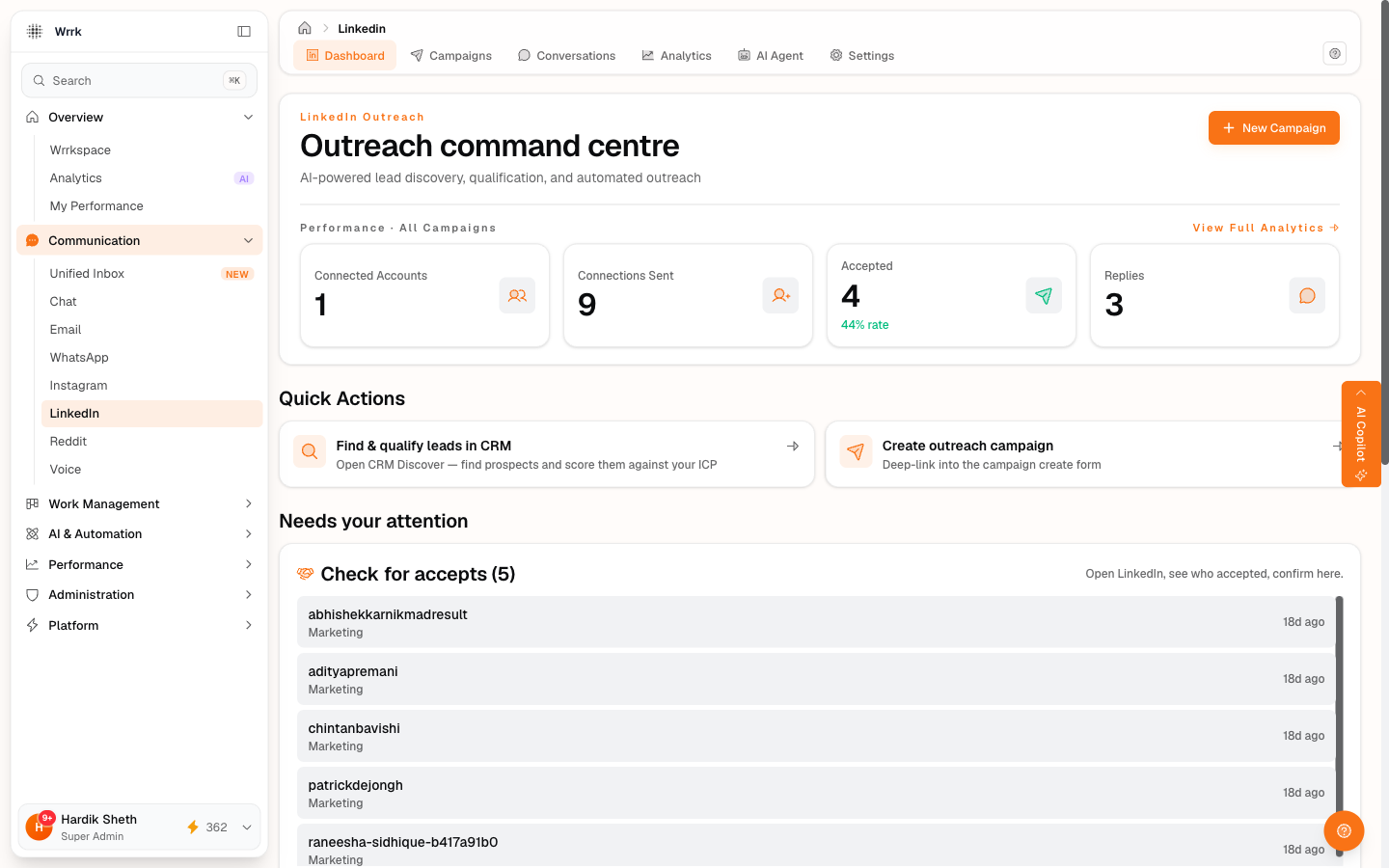
A daily morning task that takes about a minute per row.
Where it lives
On the LinkedIn dashboard, the Check for accepts card lists every recipient in invited state where the invite was sent more than 24 hours ago. Fresh invites (under 24h) sit in a collapsible Sent recently (N waiting) panel below.
The 24-hour suppression rule
By default, Check for accepts hides invites less than 24h old. Reason: LinkedIn accept latency is typically hours, not seconds, you shouldn't be asked to "check if they accepted" 30 seconds after sending. If you really want to see fresh sends, expand the Sent recently section.
The trust model
wrrk does not get notifications from LinkedIn when an invite is accepted. There's no webhook, no polling, every state transition on this card is user-confirmed. The amber inline warning says so explicitly. Misclick "Yes, accepted" on someone who didn't actually accept, and your state drifts silently, only you know.
The flow
- Click a row → the confirmation card opens for that recipient.
- Click Check profile on LinkedIn: opens their profile in a new tab.
- On LinkedIn, look at their profile header. Are you connected? Sometimes it shows in My Network → Manage under accepted invitations.
- Back in wrrk, click one of:
- Yes, accepted: state
invited → accepted. Conversation row seeded.connectionsAccepted +1. Auto-pause check runs. - Still waiting: no state change. Row stays visible.
- Withdraw invite: state
invited → excluded. Row drops.
Why "Still waiting" keeps the row visible
In older versions, "Not yet" used to filter the row out locally, then it would reappear after a page refresh, confusing. Now: only Yes/Withdraw change state and drop the row. Still waiting is exactly that, an I haven't seen them accept yet, ask me later signal.
Also available inside the campaign
The same accept-confirmation flow lives on every invited row inside a campaign's Recipients tab, click the row and it expands into the same Yes, accepted / Still waiting / Withdraw invite card, with the same amber trust-model reminder. Use this when you want to act on a specific prospect inside a single campaign without scrolling through the org-wide dashboard list. See [state-aware-recipients-tab].
Tags
Related Articles
Launch a campaign and send invites
Launch flips status to running. The Send Queue is a scrollable list; pick a prospect, copy the note, open LinkedIn, paste, send, confirm via one of five buttons.
Message your accepted LinkedIn connections
Draft my first message (1 credit) or Write my own (free). Pull from CRM and switch-campaign chip on the header keep the prospect + campaign context accurate.
Acceptance rate and auto-pause safety
Auto-pause flips running campaigns to paused if your acceptance rate dips below the safety threshold (default 30%).
State-aware Recipients tab
Per-row state pill + attention badge + click-to-expand inline actions. Continue the workflow from any row, send invites and confirm accepts without leaving the campaign.