Message your accepted LinkedIn connections
Draft my first message (1 credit) or Write my own (free). Pull from CRM and switch-campaign chip on the header keep the prospect + campaign context accurate.
Message your accepted LinkedIn connections
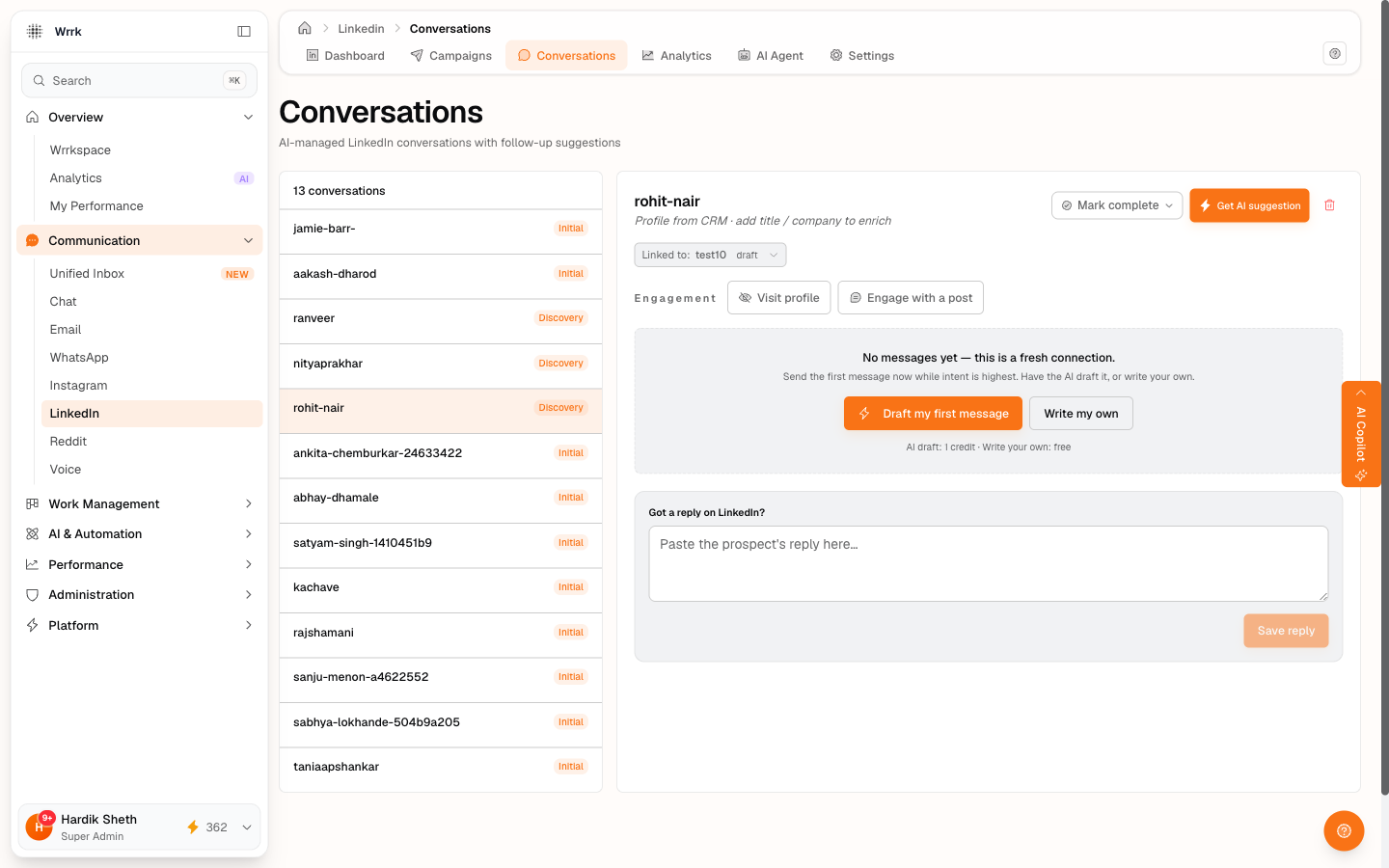
Once a prospect has accepted, a conversation row is seeded automatically. From there, the AI agent does most of the work, at a cost of 1 credit per draft. You can also write the first message yourself for free.
Open the conversation
Click Conversations in the LinkedIn sub-nav (/linkedin/conversations). The list is sorted by most-recent activity. Click your accepted prospect.
The conversation header
The header above the message thread shows:
- Prospect name + headline + company (if known). If they're missing, you'll see "No profile data" with two recovery buttons:
- Pull from CRM: fetches your CRM contacts, finds one whose
linkedinUrlmatches this prospect's slug, and copies name / headline / company into the conversation. One click, no typing. - Add manually: opens an inline 3-field form (Name / Headline / Company). Save → header updates immediately.
- "Linked to: [campaign name]" chip: shows which campaign this conversation belongs to. Click the chip to open a dropdown of all your campaigns → pick another → the conversation re-links. Useful when an old test campaign with placeholder data is feeding the AI junk context.
First-message zone (when no messages yet)
A fresh accept with zero messages gets a dedicated empty-state panel above the message thread. Two paths:
- ✨ Draft my first message: costs 1 credit. AI drafts a short, warm intro using the campaign's objective + product description + the prospect's profile.
- Write my own: costs 0 credits. Opens a textarea where you type the intro yourself. Same Copy → Open → Paste → confirm loop as everywhere else.
The AI agent treats fresh accepts as the highest-intent moment, it no longer returns wait for a connection with zero messages. If you click Draft my first message and the AI still returns wait, it usually means the linked campaign has placeholder data (use the switch-campaign chip above to re-link to a campaign with real product/objective).
Click Get AI suggestion (1 credit), for ongoing conversations
Once a thread is going, the Get AI suggestion button at the top of the conversation pane drives the rest. Each click costs 1 credit (feature key: linkedin_followup, labeled "LinkedIn AI Suggestion" in your billing log).
The agent reads:
- Your linked campaign's product description + objective + booking link
- The prospect's name, headline, and company
- Extracted facts from past messages (interest signals, objections, timing)
- Recent message history and days since last outgoing message
It returns one of four decisions:
The four AI decisions
- send_message: Confirmation card opens with the drafted message + a deep link to LinkedIn's compose URL. Same Copy → Open → Paste → Send → confirm loop. Message appends to the thread,
messagesSent +1. - wait: Shows the recheck window in hours, e.g. "Re-check in roughly 48 hour(s)". The agent has decided it's too early to nudge. No action needed.
- mark_complete: One-click button to mark the conversation as closed (outcome reached). Use this when the prospect has agreed / declined / unsubscribed.
- escalate: Flagged for manual review. The agent doesn't know how to handle what this prospect said.
When to use it
Every time the conversation moves. After accepting their invite. After they reply. After 72h of silence. The agent reads the most-recent state, so it produces a fresh decision each time, no point caching its output across days.
What the agent doesn't do
It doesn't auto-send. Every message you see in the conversation thread was confirmed by a click. The agent only drafts and decides.
Tags
Related Articles
Check who accepted your invites
24h+ invites surface for confirmation on the dashboard. Same flow available inline on Recipients tab rows. Yes accepted, Still waiting, or Withdraw, all user-confirmed.
Record replies and follow up on stalled threads
Check for replies (24h+) has an inline paste-reply input. Time to follow up (72h+) deep-links directly to the prospect's conversation.
Troubleshooting LinkedIn campaigns
Common LinkedIn issues, unknown timestamps, repeating rows, empty CRM contacts, AI "wait" on fresh accepts, drifted stats, reconnect prompts, safety-gate confusion, per-campaign scope, and how to fix each.