Record replies and follow up on stalled threads
Check for replies (24h+) has an inline paste-reply input. Time to follow up (72h+) deep-links directly to the prospect's conversation.
Record replies and follow up on stalled threads
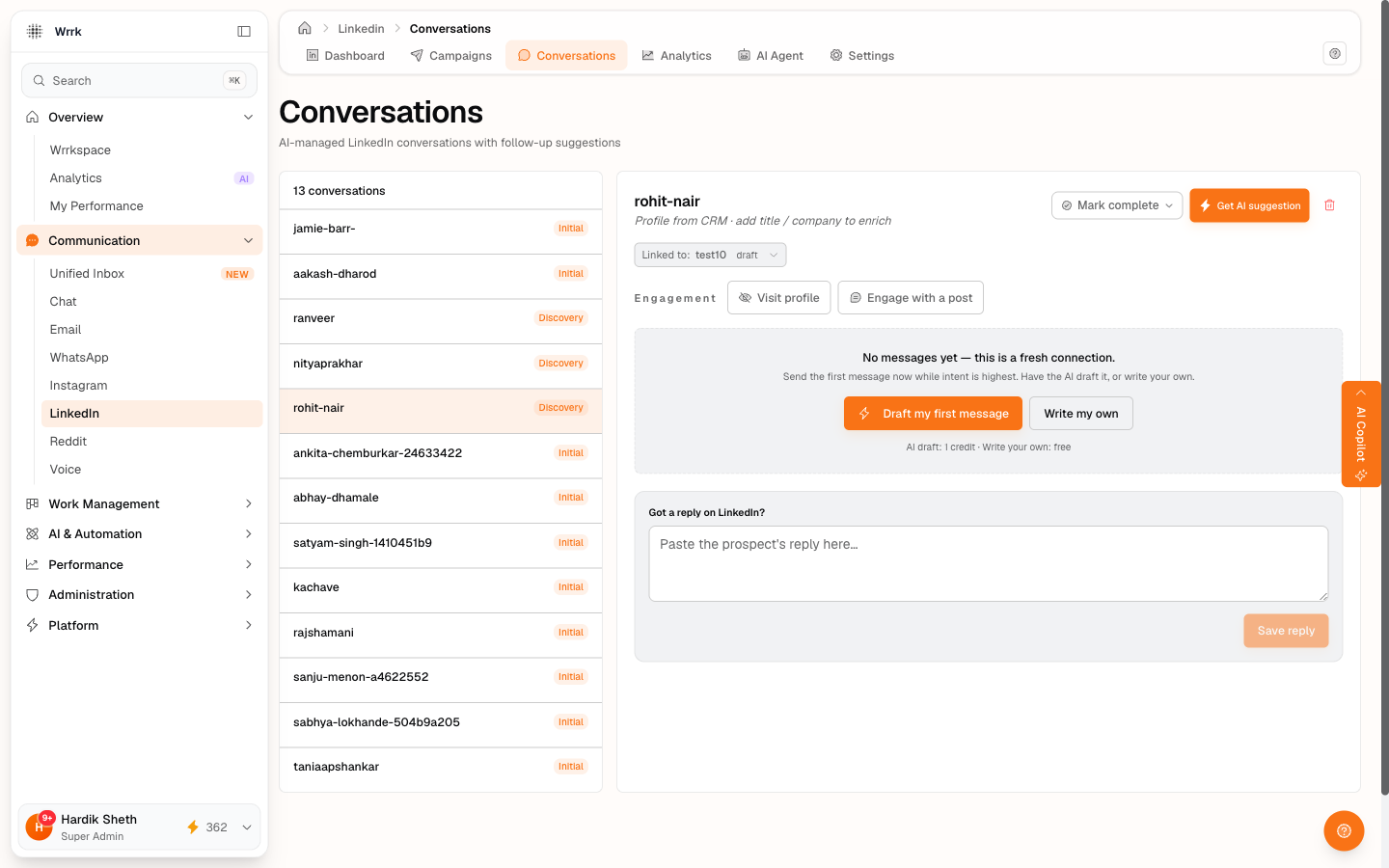
LinkedIn doesn't notify wrrk when someone replies to your message, you have to record it yourself. The dashboard has two cards that prompt you.
Card 1, Check for replies
Lists conversations where you sent something 24+ hours ago and haven't recorded a reply yet.
- Click a row → opens the LinkedIn thread in a new tab and reveals an inline paste-reply textarea.
- On LinkedIn, find their reply and copy the text.
- Back in wrrk, paste it into the textarea and click Save reply.
What wrrk does on save:
- Appends an inbound message to the thread
- Ticks
repliesReceived +1 - Runs AI fact-extraction on the reply so the agent has fresh context for the next suggestion
- The row drops out of the Check for replies card
Card 2, Time to follow up
Lists conversations stalled 72+ hours since your last outbound, still no reply.
- Click a row → deep-links directly into the specific prospect's conversation page (the conversations list auto-selects that thread for you, no need to find it manually).
- Click Get AI suggestion (1 credit).
- The agent reads the silence as a follow-up cue and drafts a nudge.
- Same Copy → Open → Paste → Send → confirm loop.
If the prospect was completed or excluded between when the card loaded and when you clicked, a toast surfaces: "No active conversation found". The list auto-refreshes once the click resolves.
Why 24h vs 72h
24h is the floor for "we sent and they might've replied, go check." 72h is "they've gone silent, time to nudge." Both numbers are wrrk defaults and not currently configurable per campaign (a future enhancement).
Sidebar nav badge
When either card has rows, the LinkedIn item in the left sidebar shows a blue pill counter, N reminders. Hidden when zero. So even when you're in CRM or Email, you know LinkedIn is waiting on you. Refreshes every 5 minutes.
Tags
Related Articles
Message your accepted LinkedIn connections
Draft my first message (1 credit) or Write my own (free). Pull from CRM and switch-campaign chip on the header keep the prospect + campaign context accurate.
Check who accepted your invites
24h+ invites surface for confirmation on the dashboard. Same flow available inline on Recipients tab rows. Yes accepted, Still waiting, or Withdraw, all user-confirmed.