Engage with a prospect's recent LinkedIn post
Inline picker on the conversation page that lists the prospect's recent LinkedIn posts so you can comment or react on a specific one. AI drafts a comment for you. A shared profile cache with Discover means most prospects are free.
Engage with a prospect's recent LinkedIn post
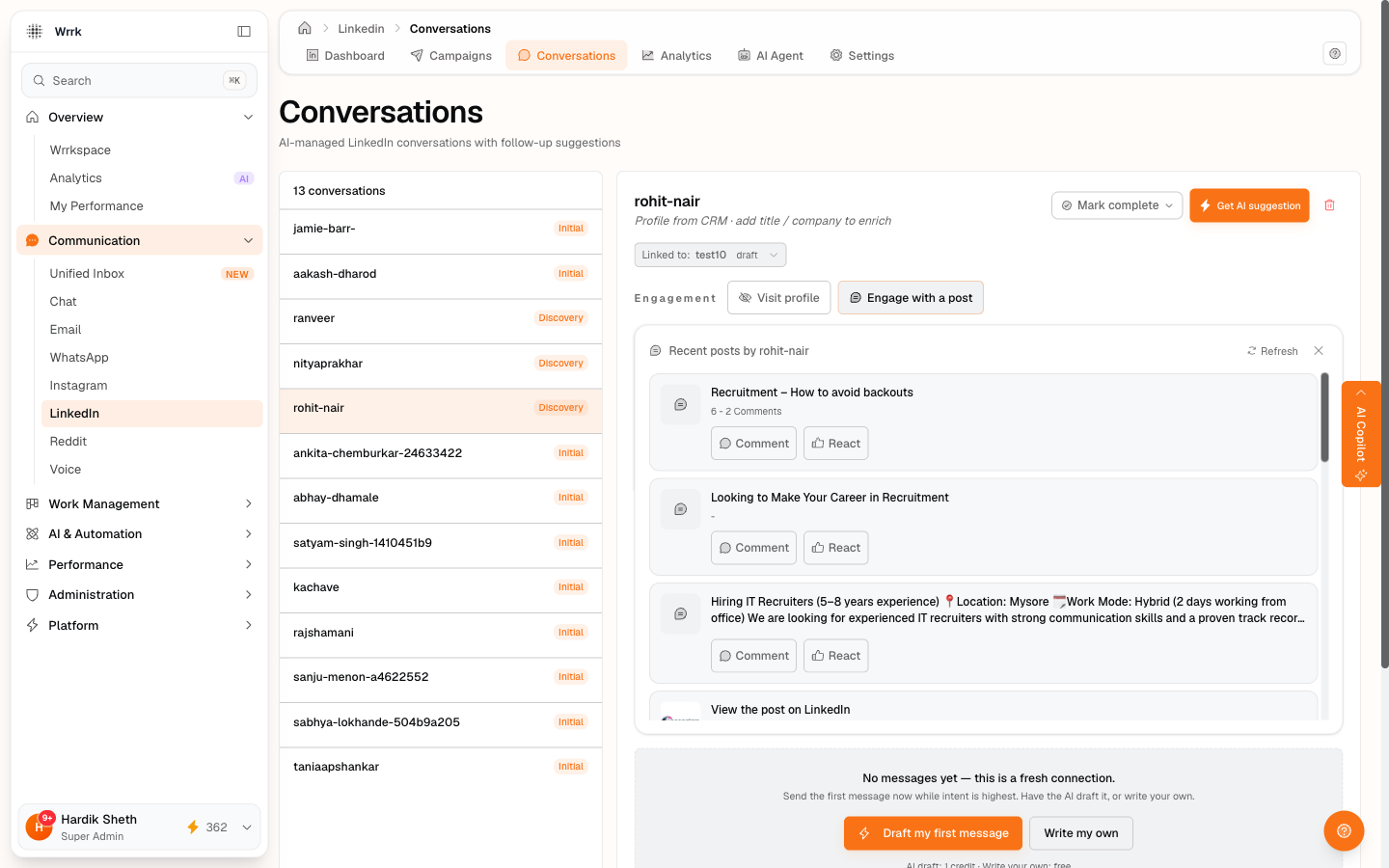
Commenting on or reacting to a prospect's recent post is a low-friction way to stay top-of-mind in between formal messages. Inside any LinkedIn conversation, the Engagement strip surfaces an Engage with a post affordance that pulls the prospect's recent activity inline so you can pick a specific post in one click, no scroll-hunting on their profile.
Where to find it
Open any conversation on LinkedIn → Conversations. Above the message thread you'll see two engagement actions:
- Visit profile: opens the prospect's LinkedIn profile in a new tab (records a profile_visited activity after you confirm).
- Engage with a post: opens the inline picker described below.
The picker, 3 phases
Phase 1, Posts list. wrrk fetches the prospect's most recent posts and surfaces the top 5. Each row shows the post title, a preview snippet, a relative timestamp, and the post's preview image when available. Two buttons per row:
- 💬 Comment: kicks off the AI-drafted comment flow (phase 2).
- 👍 React: skips the draft and goes straight to confirm (phase 3).
Phase 2, AI-drafted comment. wrrk drafts a short, professional comment in an editable textarea using the post's title and the prospect's name as context. You can:
- Edit the draft inline before sending.
- ✨ Regenerate for a different angle (costs another 1 credit).
- Skip the draft entirely, clear the textarea and continue with your own words.
- Hit Back to posts to pick a different post.
Phase 3, Confirm. Once you're happy with the draft (or chose React), the picker hands off to the same ActivityConfirmation card the rest of LinkedIn uses:
- Copy the comment text.
- Open post to comment (or react), opens the specific post on LinkedIn in a new tab.
- Manually paste + post on LinkedIn, wrrk can't do this for you (no LinkedIn API access at our partner tier).
- Back in wrrk: Yes, commented / Yes, reacted / Not yet / Skip. Yes records a
comment_madeorreaction_madeactivity on the prospect's audit log.
Where the post data comes from
wrrk uses our LinkedIn profile-data provider (the same source the Discover module uses) to fetch the prospect's recent posts. Critically, the cache is shared with Discover: if a prospect was enriched by a Discover sweep earlier this week, opening the picker is free and instant for everyone else on the team.
Credits
| What | Cost | When |
|---|---|---|
| Open the picker for a prospect already in the shared cache | 0 | Cache hit (sub-second response) |
| Open the picker for a prospect not in the cache | 2 | Fresh profile fetch (~30–120s). Charged only on success: failed scrapes are free. |
| Force-refresh an already-cached prospect (small ↻ button) | 2 | Same fresh-scrape path. Use when you suspect the cached data is stale. |
| AI-drafted comment | 1 | Per draft. Regenerate is another 1. |
| Reaction | 0 | No AI draft needed. |
The credit cost for the fresh scrape is surfaced in a toast after the response lands so you know what you paid.
Why fresh scrapes can take up to ~2 minutes
Our profile-data provider doesn't return inline for cold prospects, it queues a snapshot job and we poll until it's ready. We block your request for up to 120 seconds. The picker shows a loading state for the whole duration; if the scrape times out or the provider returns no data, the picker surfaces a friendly error and your credits are not deducted.
What the picker can't do
- It can't auto-post. Same constraint as every other LinkedIn flow in wrrk, LinkedIn doesn't expose a write API at our partner tier, so the actual comment / reaction has to happen in your browser. The picker just gets you to the right post with the right text on the clipboard.
- It can't see private posts. The provider only sees what's publicly visible on the prospect's profile. If they post sparingly or restrict visibility, the picker may show No recent posts found, fall back to Visit profile for those.
- It doesn't cover Pulse articles as a distinct section, long-form articles are surfaced inline with the rest of the activity when present. They use the same deep-link.
When to use it vs Visit profile
- Engage with a post when you want to warm a relationship, a thoughtful comment on a recent post is the highest-leverage low-effort touch on LinkedIn.
- Visit profile when you want to research the prospect (look at their work history, mutual connections, etc.) or when Engage with a post turned up no recent activity. Profile visits also record an activity log entry, handy for the N profile views today tracking on the dashboard.
Tags
Related Articles
Message your accepted LinkedIn connections
Draft my first message (1 credit) or Write my own (free). Pull from CRM and switch-campaign chip on the header keep the prospect + campaign context accurate.
Record replies and follow up on stalled threads
Check for replies (24h+) has an inline paste-reply input. Time to follow up (72h+) deep-links directly to the prospect's conversation.
Troubleshooting LinkedIn campaigns
Common LinkedIn issues, unknown timestamps, repeating rows, empty CRM contacts, AI "wait" on fresh accepts, drifted stats, reconnect prompts, safety-gate confusion, per-campaign scope, and how to fix each.