User Guide
Updated 2026-09-21
Deals and Pipeline Management
Track deals through customizable pipeline stages with revenue insights.
Deals and Pipeline
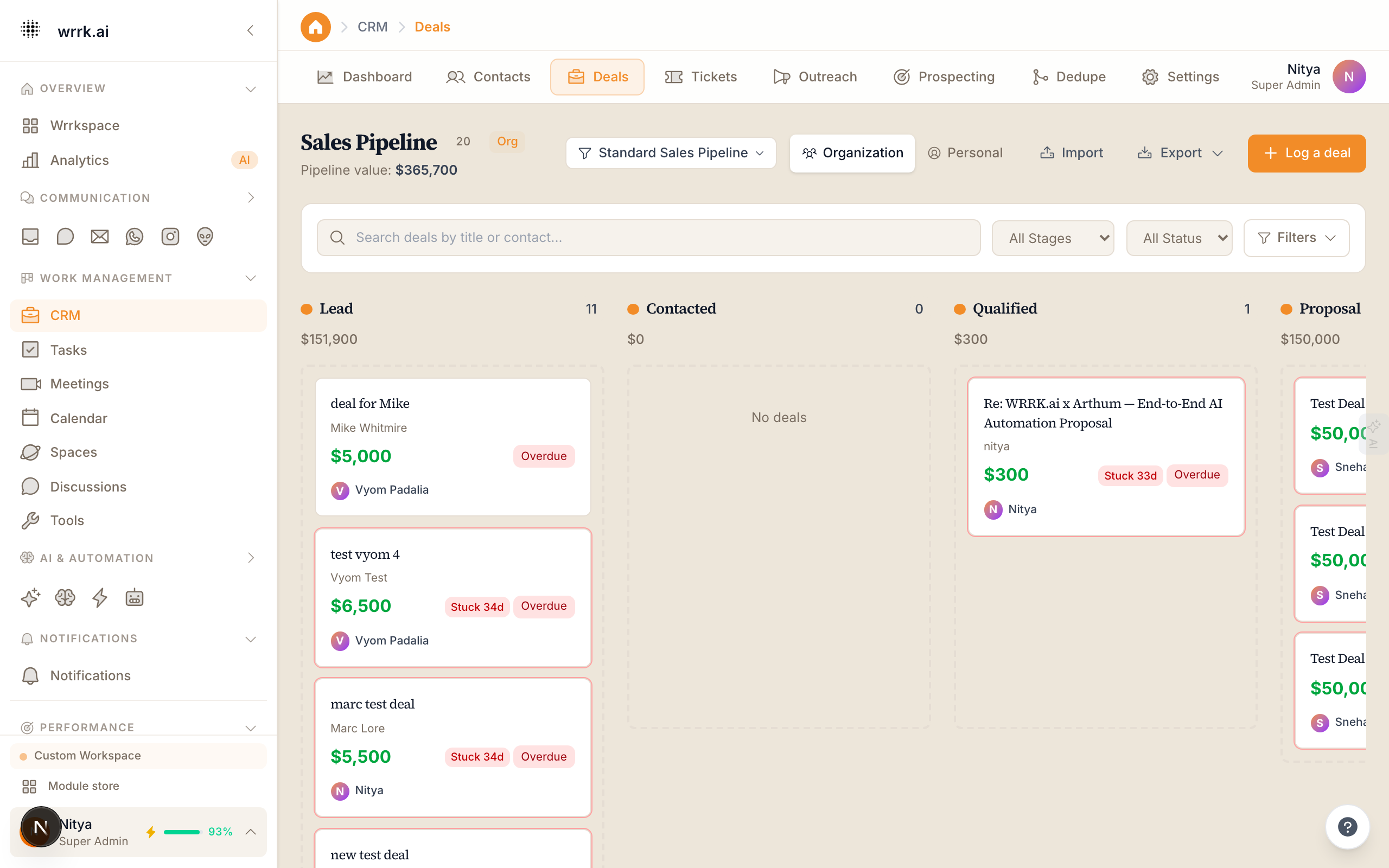
Deals represent potential revenue opportunities. The pipeline is a visual way to track where each deal stands in your sales process.
Pipeline View
Navigate to CRM > Deals to see your pipeline. Deals are displayed as cards in a Kanban board, organized by stage. Default stages include:
- Lead: Initial contact or inquiry.
- Qualified: The prospect has shown genuine interest.
- Proposal: You have sent a proposal or quote.
- Negotiation: Terms are being discussed.
- Closed Won: Deal successfully completed.
- Closed Lost: Deal did not proceed.
Creating Deals
- Click New Deal or click the + button in any pipeline stage.
- Fill in:
- Deal Name: A descriptive title (e.g., "Acme Corp Annual License").
- Value: Expected revenue amount.
- Contact: The associated contact or company.
- Stage: Current pipeline stage.
- Expected Close Date: When you expect to close the deal.
- Assigned To: The team member responsible.
- Click Save.
Moving Deals
Drag and drop deal cards between stages to update their status. You can also click a deal to open it and change the stage from the detail view.
Deal Detail Page
Click any deal to see:
- Overview: Deal value, stage, close date, and assignment.
- Activity Log: All related emails, calls, meetings, and notes.
- Contact Info: The associated contact's details.
- AI Insights: Win probability, suggested next action, and similar past deals.
Revenue Tracking
The CRM dashboard shows revenue metrics computed from your deals:
- Pipeline Value: Total value of all open deals.
- Revenue This Month: Total value of deals closed this month.
- Average Deal Size: Mean value across closed deals.
- Win Rate: Percentage of deals that close as Won.
Customizing Stages
You can customize pipeline stages from CRM > Settings > Pipeline:
- Add new stages by clicking Add Stage.
- Rename existing stages by clicking the stage name.
- Reorder stages by dragging them.
- Set a default probability percentage for each stage.
Tips
- Review your pipeline weekly to identify stalled deals.
- Use the Expected Close Date to forecast revenue.
- Let AI suggest the next best action for each deal to keep things moving.
Tags
crmdealspipelinesalesrevenue