Reassign ownership of a LinkedIn account (admin)
Super-admin only. Transfer ownership of a connected LinkedIn account to a different teammate when the original owner leaves or the account was connected under the wrong identity. Doesn't auto-migrate campaigns.
Reassign ownership of a LinkedIn account (admin)
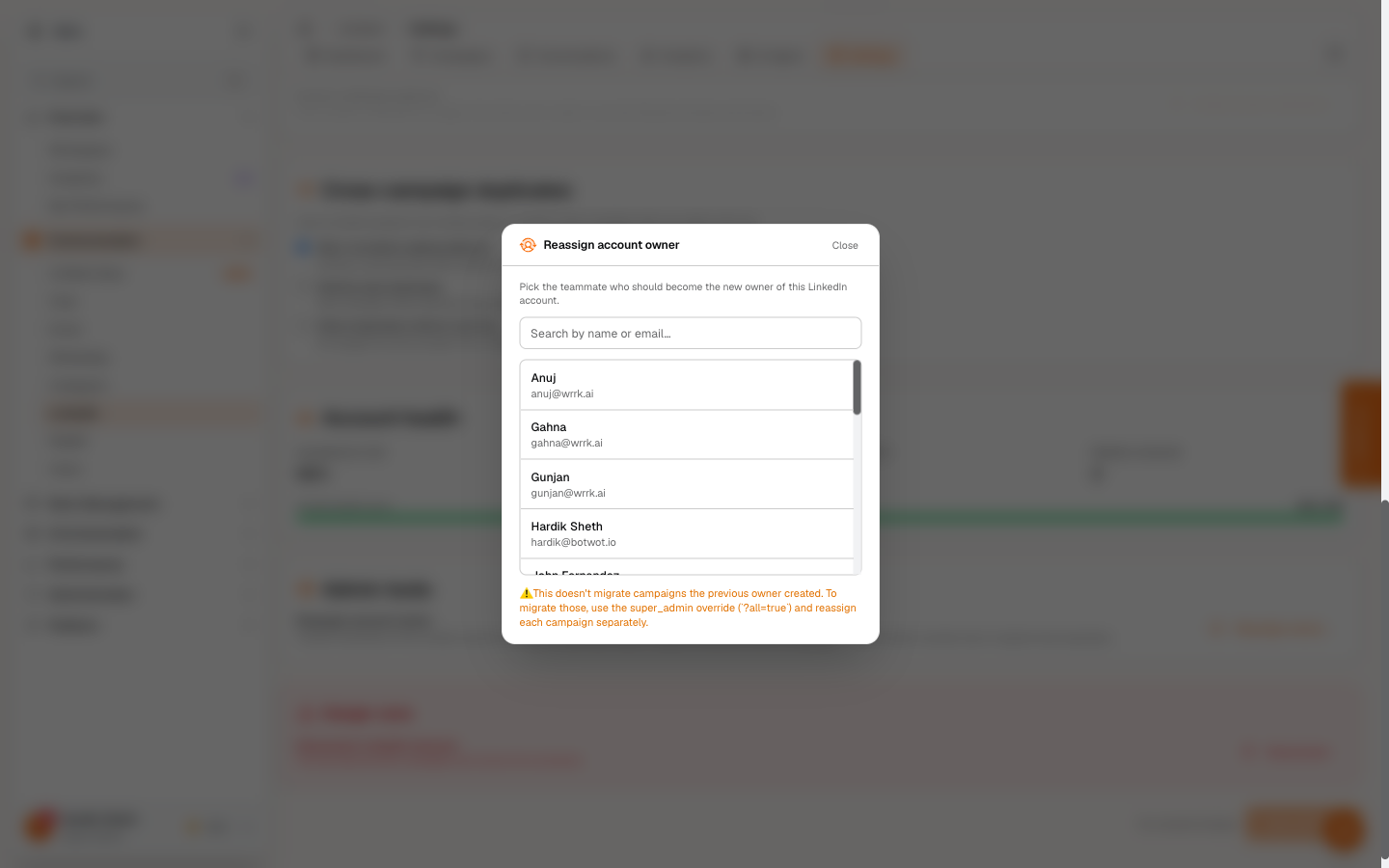
A LinkedIn account in wrrk is owned by whoever clicked Connect LinkedIn for it. The owner controls account-level settings (daily limits, working hours, AI agent mode, disconnect) and is the only person who can edit or launch campaigns attached to the account, even when those are flipped to Team scope.
When the original owner leaves the company or you realise an account was connected under the wrong identity, an org admin can reassign ownership to a different teammate without disconnecting and reconnecting the account.
This article is admin-only. The button is hidden from non-admins, and the underlying endpoint returns 403 if you call it without the super_admin role.
When to use it
- A teammate left the company. The account they connected is shared with the team (or needs to be) and someone else needs to manage it.
- An account was connected under the wrong identity by mistake.
- Internal migration, splitting one person's accounts across multiple teammates.
If you just want a teammate to see the account without owning it, flip it to Team scope from Settings instead. Reassignment is the heavier move, use it only when the actual owner needs to change.
How to reassign
- Open LinkedIn → Settings.
- If you have multiple connected accounts, pick the one to reassign from the Account dropdown.
- Scroll to the Admin Tools section (visible only to super-admins).
- Click Reassign owner… to open the member picker.
- Search by name or email; click any teammate to assign them as the new owner.
The current owner's row shows a Current owner chip and is non-selectable.
After confirmation:
- The account's owner field updates immediately.
- The Settings page reloads so owner-only controls re-evaluate (the previous owner, if it was you, loses Save / Disconnect access on this account).
- A success toast confirms the change.
What it doesn't do
Campaigns owned by the previous owner are not auto-migrated. They keep their original userId and stay scoped to whoever created them. The reassignment only updates the account itself.
This is deliberate, bulk-migrating someone's outreach work could blow away campaigns the new owner has no context for, and silent ownership changes are hard to undo. If you genuinely need to move campaigns over:
- Use the super-admin override (
?all=trueon the campaigns endpoint) to surface every campaign in the org, including ones owned by the departed teammate. - Decide per-campaign whether to cancel + recreate, flip to Team scope (so the new owner can view it), or leave alone.
A dedicated bulk-migration UI is not built yet, handle these by hand for now.
The super-admin override view
The list endpoints (/api/linkedin/account/status, /api/linkedin/campaigns, /api/linkedin/conversations) accept an ?all=true query param that bypasses the normal per-user scope filter. The override is honored only when the caller is a super_admin, non-admins silently get the normal scoped path regardless of what they pass.
There's no dedicated UI for this today; admins access it by appending ?all=true to the request URL in browser DevTools / their own tools when doing audit sweeps or migrations.
Tags
Related Articles
Share a LinkedIn account with your team
Flip an account or campaign to Team scope so everyone in your org can see it, modeled on email's Team Inbox. Owner stays in control of edits and sending still happens in the teammate's LinkedIn browser session.
Connect your LinkedIn account
Two-minute setup: sign in via OAuth, tick the Premium box if applicable, set your auto-pause threshold.